
From 1 July 2026*, the Medicare Assignment of Benefit (AoB) process will undergo a major digital transformation, supported by legislative changes and the need for more secure and efficient healthcare billing. Assignment of Benefit (AoB) refers to the process by which a patient authorises Medicare to pay their benefit directly to the healthcare provider, rather than reimbursing the patient.
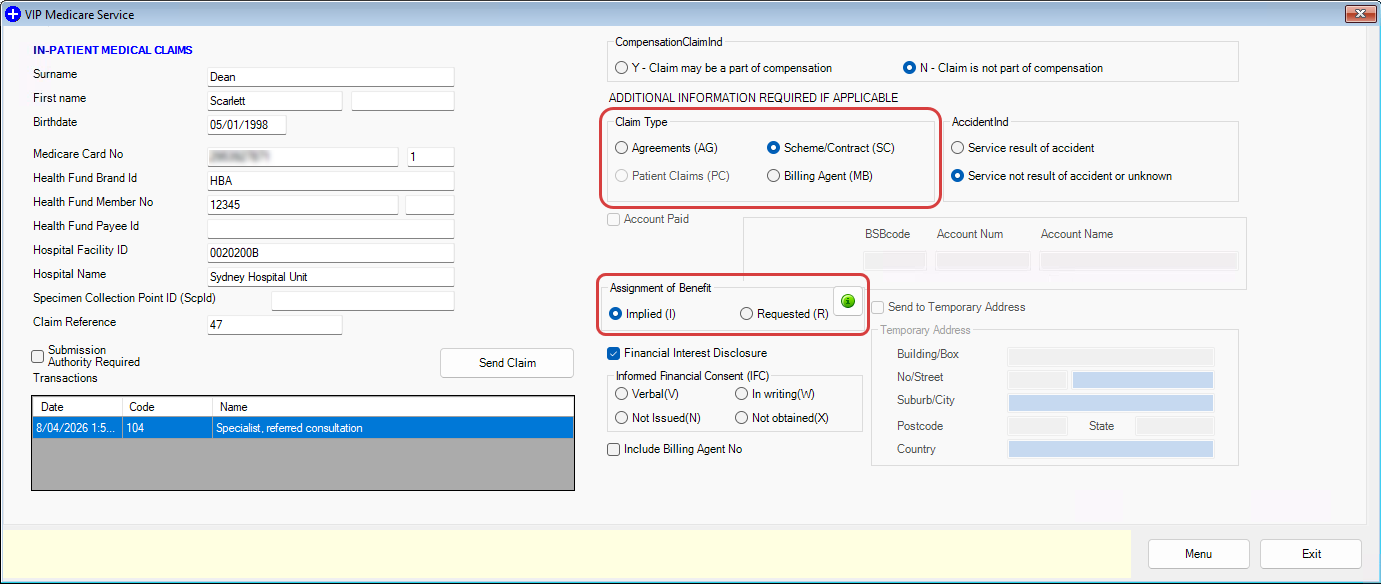
In Bp VIP.net, new radio buttons will be included to indicate Implied or Requested Assignment of Benefits for IMC claims, and the DB4 Bulk Bill Assignment of Benefit Agreement form will be updated to include the new required fields.
NOTE For more information see the Australian Government Department of Health, Disability and Ageing (DoHDA) website and the Bp VIP.net article Assignment of Benefit.
*Important Update on 1 July 2026 Assignment of Benefit Changes
The Government has revised the Assignment of Benefit transition timeline, as published here. Key changes include:
- From 1 July, verbal consent will be available in all Bulk Billing settings for 12 months.
- Compliance will not commence until regulatory changes are complete and will begin with prevention and education.
- There will be a 12-month transition period, during which there is a commitment to work on the changed approach and explore other options to further reduce the administrative burden on both practices and patients while ensuring the integrity of Medicare is maintained.
Assignment of Benefit (AoB) refers to the process by which a patient authorises Medicare to pay their benefit directly to the healthcare provider, rather than reimbursing the patient. This arrangement streamlines payments to providers and reduces administrative effort for both patients and practices.
The Department of Health, Disability, and Ageing (DoHDA) are streamlining Medicare billing for bulk billed services and simplified billing services, with amendments recently made to the Health Insurance Act 1973.
Under the Act, for a service to be bulk billed, the patient must agree to give their Medicare benefit to the clinician, and this be recognised as full payment for the service.
This agreement, known as an Assignment of Benefit, has been required to be captured on a standardised paper form (generated in Bp VIP.net when selecting ‘Print Form (0)’ on a bulk billed consultation).
As a Bp VIP.net user, whether you are a specialist, a nurse, a practice manager, or administrative staff, the changes coming on 1 July 2026 will have an impact on the way you conduct bulk billing.
This means that additional steps may be added to some bulk billing workflows. For example, when reconciling bulk bill batches with rejected services, you may need to collect a new Assignment of Benefit from the patient when changing an MBS item number for a service.
DoHDA does note that work is ongoing on regulations to support ‘bulk billed enduring assignment agreements’, which are designed to reduce the number of times patients will need to give consent.
An updated paper-based workflow is coming in the near future, with more information to be provided nearer to the commencement date. In addition to this updated form, there will be two additional features that will be altered to accommodate this change:
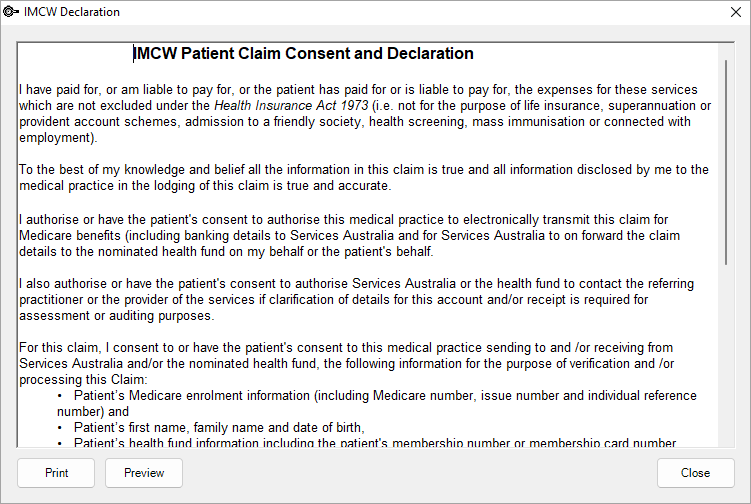
IMCW Patient Claim and Consent Declaration
When sending IMC-PC claims the IMCW Patient Claim and Consent Declaration has been updated with new wording in compliance with the Assignment of Benefit reforms from Services Australia.
For IMCW Patient Claim changes there will also be the inclusion of selecting Implied or Requested Assignment of Benefit for IMC claims.
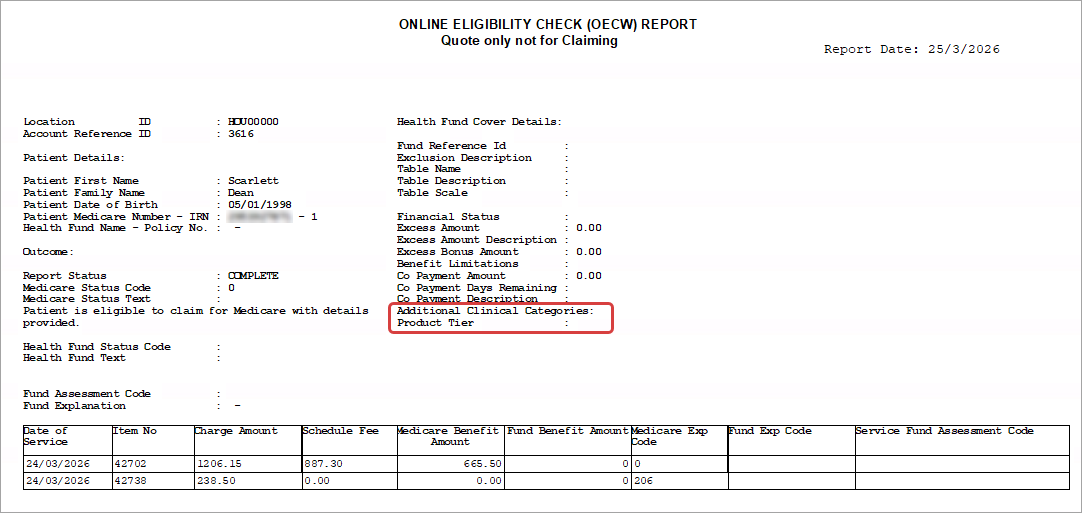
Online Eligibility Check (OECW) Report Updates
The Online Eligibility Check (OECW) Report will be updated to include two new fields in compliance with the Assignment of Benefit reforms:
- Additional Clinical Categories
- Product Tier.
Bulk Billed consultations with Print Form (0) on the Consultation screen ticked will launch the Report preview screen when finalising the invoice with the updated DB4 Post-Assignment of Benefit form.
Providers will be required to retain the completed/signed agreement for 2 years for each Assignment of Benefit consent request. This retention period is essential for meeting audit and compliance requirements.
Not all patients will be able to complete an assignment themselves. The new forms ask the question, ‘Is the assignor the patient?’, to capture when the assignment has been completed by somebody acting on the patient’s behalf.
This can be done for children/minors or patients who lack the capacity to complete this independently.
| Assignment of Benefit | Work Type | Definition |
|---|---|---|
|
Implied (I) |
If the Work type is Scheme/Contract (SC) or Agreement (AG), then the default Assignment of Benefit value is Implied (I). |
Implied assignment applies if a health professional has an agreement with an insurer (e.g., Medical Purchaser Provider Agreement or Gap Cover Agreement) and it applies to the service assigned/to be assigned. The terms of each insurer agreement may vary depending on each insurer and health provider. |
|
Requested (R) |
If the Work type is None, the default Assignment of Benefit value is Requested (R). |
A Requested assignment (R) may be required:
|
As the changes move through development and testing, our Knowledge Base will be updated regularly. Bookmark the Bp VIP.net Knowledge Base to keep it within reach as more information develops. Keep an eye on communications from Best Practice Software in the coming months as these workflow changes will be making their way to your inbox.
Last modified: 30 June 2026



 AU
AU  support@bpsoftware.net