
These release notes describe the changes made to Bp Premier since Spectra SP1 Revision 3 build 1.13.1.1096.
IMPORTANT This release is no longer available to download due to the Australian Government and Department of Health, Disability and Ageing changes to the Assignment of Benefit (AoB) reforms announcement on the 18th of June. Please read this article for more information.
|
Release Date |
09 June 2026 |
|
Release version |
Bp Premier version Oxford 1.14.0.1114. |
|
Notes last updated |
05 June 2026 |
|
Which version can I upgrade from? |
You can upgrade to version Oxford (1.14.0.1114) from Bp Premier version Orchid SP1 Revision 1 (1.12.1.1023) or later. To check the current program version that you have installed, select Help > About. |
|
Which data update do I need? |
You must install the April 2026 Data Update or later before you can upgrade to version 1.14.0.1114. However, Best Practice Software recommend making sure you have the most recent Data Update installed before you run a program upgrade. |
|
Which database and operating system versions are supported? |
Windows operating system Windows 10 Pro or higher is supported. Microsoft Windows Server 2016 and higher is supported. Microsoft SQL Server 2016 and higher is supported. |
|
When should I upgrade? |
Best Practice Software recommend running the program upgrade outside of business hours. |
|
How do I upgrade? |
Brief upgrade instructions are included in this document. |
Upgrade to Oxford 1.14.0.1114
You must have the April 2026 data update or later installed before you upgrade to Oxford 1.14.0.1114.
- Back up your Bp Premier database before running the upgrade.
- Synchronise all workstations in remote database mode with the Bp Premier server before you upgrade.
- Download and run the latest Drug Update on your Bp Premier server computer.
- Log all users out of the server and all clients before you upgrade.
- Download and run the Oxford 1.14.0.1114 update on your server and all clients.
- Log back in to Bp Premier and resume use.
Where do I find more information?
Select  from the main screen of Bp Premier or select Help > Online from Bp Premier to open the Knowledge Base from any main screen toolbar.
Microsoft SQL Server 2016 end of support
Microsoft support for SQL Server 2016 ends 14 July 2026. Best Practice Software recommends users running Bp Premier on SQL Server 2016 upgrade to a supported Microsoft SQL Server before the end of support date. See the End of support options on the Microsoft website for more details.
Compliance
MySL Date Created
Updates have been made to the Date Created field in the View MySL field in accordance with ADHA compliance. Up to Spectra SP1 Revision 3, the Date Created column in MySL responds differently to two scenarios:
- For new prescriptions, the Date Created will generally be the Date the medication was initially prescribed.
- If the doctor prescribed the medication with repeats, the Date Created will be updated to reflect the Date the repeat was last dispensed from the pharmacy.
This has been resolved in Bp Premier Oxford to always show the original prescription date.
Australian Immunisation Register
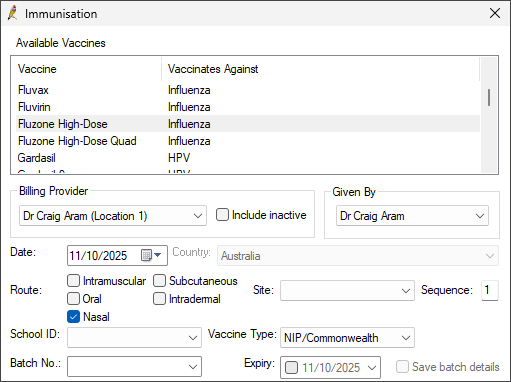
From 20 October 2025, changes to the Australian Immunisation Register (AIR) took effect. A new option for 'Route of Administration' has been added. Nasal, as a Route of Administration, is currently only valid for one vaccine: FluMist.
National Immunisation Program
From 1 September 2025, changes were introduced to the National Immunisation Program.
Prevenar 20
Based on the advice from Australian Technical Advisory Group on Immunisation (ATAGI), the government has made changes to the National Immunisation Program. Prevenar 20 was introduced into the NIP to replace Prevenar 13 and Pneumovax 23 on the childhood and adolescence schedule.
NOTE Check the Known Issues for any potential workarounds that may need to be performed for this feature.
Pneumococcal vaccines
The current recommended dose (3) given at 6 months of age will be expanded to include all Aboriginal and/or Torres Strait Islander children, irrespective of location if the following conditions are met:
- The individual is under 5 years of age
- The individual is Aboriginal and/or Torres Strait Islander OR the individual has a risk condition for Pneumococcal disease.
Bulk Bill Claim Date Updates
From 05 September 2025 the following Bulk Bill claims will not be accepted by Medicare:
- Claims with a Medical Event Date greater than 2 years in the past for service rendered before 5 September 2025.
- Claims with a Medical Event Date greater than 1 year in the past for service rendered on or after 5 September 2025.
When creating a new online claiming batch only vouchers with eligible claiming dates will populate in the batch.
Assignment of Benefits Reforms
Assignment of Benefit process is going digital. Assignment of Benefit (AoB) refers to the process by which a patient authorises Medicare to pay their benefit directly to the healthcare provider, rather than reimbursing the patient.
IMPORTANT On the 18th of June it was announced that the Government has revised the Assignment of Benefit transition timeline. Please read this article for more information.
Some of the key changes being introduced include:
- Electronic Forms: Providers will be able to generate and send electronic forms via SMS to patients to assign their benefits through web forms on their own devices.
- Pre and Post-Assignment Flexibility: New digital options will allow benefits to be assigned when booking a service (pre-assignment) or after a service has occurred (post-assignment), rather than strictly during the attendance.
- Basic Service Description: For episodic pre-assignment agreements, a 'basic service description' will be the minimum required information. Approximately 4,600 MBS items have been mapped into 16 categories (e.g., GP – Standard, Specialist – Procedure) to provide patients with meaningful information while maintaining flexibility for providers.
- Record Retention: Providers will be required to retain a copy of the completed/signed agreement for 2 years.
For more information see the Australian Government Department of Health, Disability and Ageging (DoHDA) website or the Bp Premier Knowledge Base AoB landing page for all of our Assignment of Benefit resources.
NOTE Check the Known Issues for any potential workarounds that may need to be performed for these features.
Enhancements
Drug Prescription Authority Requirements/Medicare Rx User interface improvements
When prescribing a drug that requires authority, users need to copy and paste multiple details to the authority's website. To improve this process, the Patient Medicare No and Authority Form No are now able to be copied to the users clipboard. A copy icon is displayed next to these information strings for visibility.

Family & Social History
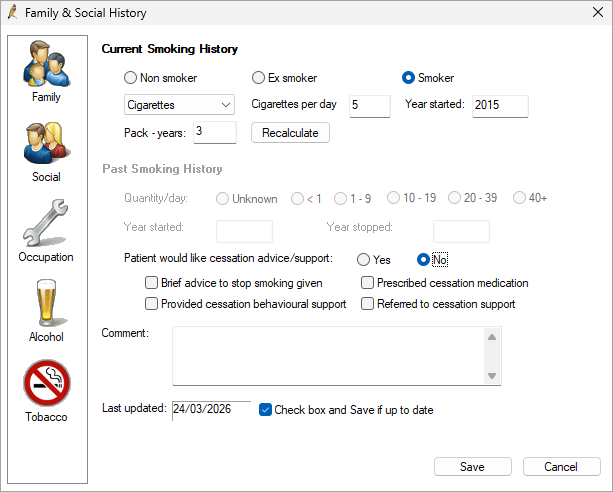
From Family & Social History > Tobacco, Current Smoking History will now display Pack years. This value is calculated from the Cigarettes per day field and the Year started field. This value can be recalculated and updated.
Chronic Condition Management Claiming Logic
As part of the ongoing support for the Chronic Condition Management (CCM) changes introduced on 1 July 2025, Bp Premier has enhanced the claiming logic that was released in version Spectra SP1 Revision 3. See the table below for additional rules added to Bp Premier.
|
Workflow |
Item |
Rule |
|---|---|---|
|
When finalising a visit and adding any CCM items. |
965/392 |
Can not be billed within the preceding 12-month period unless extenuating circumstances exist. |
|
92029/92060 |
||
|
When adjusting or creating an invoice and adding any CCM items. |
965/392 |
Cannot be billed within the preceding 12-month period unless extenuating circumstances exist. |
|
92029/92060 |
||
|
92030/92061 |
Cannot be billed within the preceding 3-month period unless extenuating circumstances exist. |
Low Memory Warning
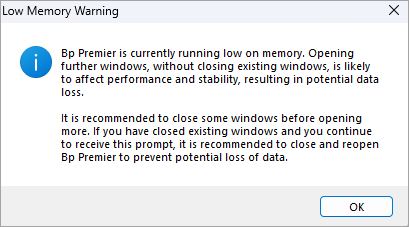
Updates have been made to Bp Premier to appropriately warn the user when Bp Premier is running on low memory and that existing windows must be closed before more can be opened.
Bp eHealth Certificate Import Tool
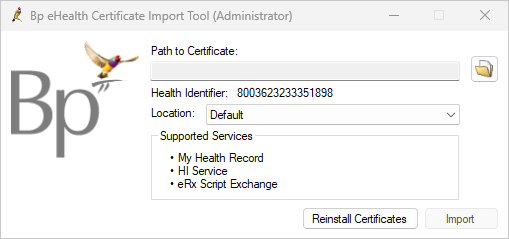
Enhancements have been made to the Bp eHealth Certificate Import Tool, simplifying the user interface, improving error handling, and improving capability. This enhancement allows users to update the NASH certificate on both the Bp Premier and eRx gateway via the eRx REST API for their default location.
Enhancements to optimise the WorkCover QLD setup process
The Install Certificates button has been removed from the WorkCover QLD Setup screen; Digital SSL certificates are no longer required to be installed on each workstation used for sending invoices to WorkCover QLD.
Bp Premier will connect to the WorkCover QLD API and obtain the required SSL certificates with each request to Upload Invoice to WorkCover QLD, ensuring that the correct certificate is used each time an invoice is sent.
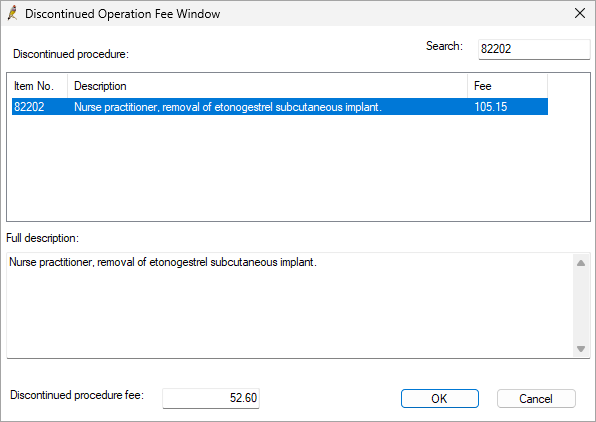
Long Acting Contraceptives (LARCs) Discontinued Operation Fee Window
When MBS item 82206 is added to an invoice in conjunction with an 82201 or 82202, selecting Add or double clicking on the item number will launch the Discontinued Operation Fee Window.
Enter the MBS item number of the discontinued operation (82201 or 82202) in the Search field and click OK to apply the Discontinued procedure fee (50%) to the invoice.
Other enhancements
|
Bp Function |
Release Notes |
Key |
|---|---|---|
|
BP Browser |
Updates have been made in Bp Premier to improve the performance of the browser window inside the software. |
78811 |
|
Co Claiming |
Fixed an issue that was occurring resulting in a 46100 item not recalculating correctly if the previously added item was removed and another was added. |
81211 |
|
|
The attachment type of REF has been removed from the list of attachment options when sending emails from the Bp word processor. |
80514 |
|
|
Error handling has been improved when emailing documents to avoid sending corrupted PDF attachments to patients. If the document or page is not valid or can't be converted to a valid PDF when emailing, an error will be displayed inform the user of this. |
80281 |
|
Lyrebird Health |
When Lyrebird Health writes back a document to Correspondence Out, closing the Lyrebird Scribe window will automatically refresh the patient record, displaying the newly written back documents in Correspondence Out. |
81418 |
|
Lyrebird Health |
The Lyrebird Scribe window will no longer prompt for users for permission to Use your microphone and will automatically bypass the request for Microphone access, ensuring that it is always permitted. |
81416 |
|
Online Services |
Bp Premier has been updated to use Transport Layer Security (TLS) 1.2 impacting:
This change is being implemented in line with advice from the Australian Signals Directorate. |
79247 |
|
Patient record |
Updates have been made to the number of patient records that can be open in one open session of Bp Premier. Previously a warning would notify the user when 15 patient records were open that more than 20 records could not be open. This has been updated to notify the user when 10 records are open that no more than 15 can be open, to optimise performance and reduce potential data loss. |
82946 |
|
Refunds |
An enhancement was made to ensure that after a partial Medicare refund of a paid batch, related Management Reports display the original payment date for non-refunded services/payments in the Medicare batch. |
77987 |
|
Reporting |
When viewing payment management reports, unrelated refunded Medicare services and payments included in the same batch will show the correct payment dates. |
81574 |
|
SQL Server |
Bp Premier has been updated to support SQL Server 2025. Warnings have been updated to account for the new 50 GB memory limit. |
82193 |
Bug fixes
|
Bp Function |
Release Notes |
Key |
|---|---|---|
|
Accounts |
When creating an account to send to Medicare and process through EasyClaim Bulk Billing, if the Activate EasyClaim Private Patient Claiming checkbox was not checked in Configuration > Payments, the EasyClaim Bulk Billing option was greyed out. This is no longer the case and the EasyClaim option will be enabled even if the Private Patient Claiming checkbox is not checked. |
81490 |
|
Appointments |
An error that was setting an appointment status to 'Paid' instead of 'At Billing' after the related invoice was cancelled has been resolved. |
81424 |
|
Bp Email |
An error that was occurring when attempting to send an email and generating a PIN to access the document or when emailing certain files from Investigations causing a fatal callstack and a program crash has been resolved. |
79306 |
|
Bp Email |
Resolved an issue occurring when sending an email without a recipient selected. When attempting to send an email without a recipient, the user would be prompted to add a recipient. After this prompt, the 'Send' button would stay disabled. This is no longer the case. |
81199 |
|
Clinical Notes |
Previously when a user did not have Write access to C:\Users\Administrator\AppData\Local\Temp\ clinical notes could not be saved with no prompt to inform the user. A pop-up message has been introduced to warn the user that they do not have appropriate access to the folder, and to contact their System Administrator. |
81875 |
|
Drug Database |
Resolved an error where after a backup was restored in a new environment, the application roles were not correctly restored in the drug database. This issue also occurred after running a full drug replacement. |
81412 |
|
|
When emailing investigations that had been zipped using certain compression libraries, an error would occur when attempting to send. This issue has been resolved. |
81162 |
|
eReferral |
Resolved an intermittent error that was occurring when attempting to send a eReferral through the Word Processor after selecting an online contact. |
78827 |
|
Documents |
Resolved an issue where when viewing PDF documents, printing Health Summaries and printing PDF documents from Investigation reports, a watermark would display at the top of the page “PDFView4NET evaluation version”. |
77785 |
|
eScripts |
When sending an eScript directly to a pharmacy the results list for the pharmacy contact would display inconsistent or unrelated results. This issue has been resolved. |
81494 |
|
eScripts |
When sending an eScript token directly to the pharmacy via email, an error would occur if the patient did not have a Title selected in their demographic details resulting Bp Premier freezing. This error has been resolved. |
81186 |
|
eScripts |
An issue has been resolved where selecting the Use Previous email address option when sending an eScript token directly to the pharmacy resulted in an error. |
81426 |
|
eScripts |
An error has been resolved where Hymenoptera Yellow Jacket Venom and Hymenoptera Paper Wasp Venom eScripts could not both be sent on the same day. |
81796 |
|
Family & Social History |
Resolved an issue that was occurring that would prompt the user to select the current Smoking status even when no data was entered into a Family or Social history tab, |
81868 |
|
Immunisations |
Resolved an error that was occurring when searching for Immunisations. After selecting 'All vaccines' and then clicking 'Add', the criteria for 'All vaccines' was not being included correctly. |
81491 |
|
Incoming Reports |
Resolved an error where reports missing a Report Date would not display in Incoming Reports. |
82163 |
|
Invoices |
Sites who have Lyrebird configured experienced an issue where an error would occur after using the Find Invoice search function after multiple searches. This error has been resolved. |
81405 |
|
Lyrebird |
Resolved an issue where an error occurred when a visit was finalised and saved in Bp Premier before the transcription in Lyrebird was stopped and saved. |
80341 |
|
Online Patient Verification |
An error has been resolved where all patients in a list for a Bulk Online Patient Verification (OPV) would fail when one patient in the list failed with name or DVA card details that did not match the Medicare database. |
73482 |
|
Patient Record |
Resolved an issue that was occurring when opening the Patient Record > Immunisations of patients 5-7 years (inclusive). This error would cause the Childhood Immunisation Schedule to be missing from the record and is no longer the case. The Childhood Immunisation Schedule will no longer display once a patient turns 8 years old. |
81795 |
|
Patient Record |
When searching for a patient by mobile or home phone number, if the search contained spaces (04XX XXX XXX), results would not be displayed for the corresponding patient. This search process has since been enhanced and included spaces will not affect the searching process negatively. |
81488 |
|
Prescribing |
Resolved an issue where deleting a script from Current Rx with a Medisecure barcode would result in a callstack error. |
79855 |
|
Prescribing |
Resolved an issue where SafeScript launched the incorrect portal for the user's state when the postcode was shared between multiple states. |
81496 |
|
Prescribing |
Resolved an error that was preventing contact details loading correctly in certain circumstances when selecting the Use Contact details email address radio button when sending ePrescription details to a pharmacy. |
81493 |
|
Results Import |
Resolved an issue where the report header did not display when a report was imported from the Results Import with an attached file. |
81495 |
|
Word Processor |
Updates have been made to Bp Premier to improve error handling when emailing from the Word Processor. |
82988 |
Known Issues
|
Bp Function |
Issue |
Fixed In |
Key |
|---|---|---|---|
|
Assignment of Benefit |
When Print 2 copies of vouchers is enabled in Setup > Configuration > Online Claiming and printing an assignment of benefit form, only one copy is printed. Workarounds: One of three workarounds can be used in this scenario.
|
Oxford SP1 |
83577 |
|
Assignment of Benefit |
Assignment of benefit forms are not correctly fitted to the page when printing with A5 vouchers enabled in Setup > Configuration > Online Claiming:
Workaround: Practices can modify the external printer settings to print A5 sized landscape AoB forms accordingly. |
Oxford SP1 |
83579 |
|
Assignment of Benefit |
When editing details of an invoice in the Account details screen accessed from Online claiming or the Patient billing history, the Assignment of Benefit fields do not function correctly. Workaround: This error does not effect the workflow and the details can still be updated without issue. An Assignment of Benefit form does not need to be generated unless changes to the services are made. |
Not yet resolved. |
83545 |
|
Assignment of Benefit |
If an invoice is linked to an Assignment of Benefit form with a status of Delivery failed it will stay in the All outstanding results of the Follow up Assignment of Benefit screen when the invoice is cancelled. |
Oxford SP1 |
83614 |
|
Assignment of Benefit |
When using the Bulk resend from the Follow up assignment of benefits screen the Contact note generated will display the Recorded by user as Practice and not the user who sent the SMS via Bulk resend. |
Oxford SP1 |
83556 |
|
Assignment of Benefit |
Assignment of benefit forms cannot be generated if a patient does not have a mobile number or home phone number entered in the Patient details. Workaround: Prior to generating a pre or post assignment, ensure patient(s) have a mobile or home phone information added. |
Not yet resolved. |
83211 |
|
Assignment of Benefit |
If Prompt for Printer is enabled in the default printer settings, when generating a printed Assignment of benefit form, if the users switches to a different Bp Premier window and back to the Appointment book, the Prompt for Printer window will be hidden causing Bp Premier to be locked. Workaround:
|
Not yet resolved. |
83485 |
|
Assignment of Benefit |
If Prompt for Printer is disabled in the default printer settings, when printing an Assignment of benefit form the Prompt for Printer screen will still appear. |
Oxford SP1 |
83480 |
|
Bp Utilities |
When opening and closing Logged on computers from Bp Utilities some users may experience a callstack error. |
Not yet resolved. |
65292 |
|
|
When sending an email from the Word Processor and opting to not use a PIN for PDF attachments, emails will still send with the text "A PIN is required to view the contents of the PDF file" though no PIN is required to open the file. Workaround: No PIN is required to open the file, the message can safely be ignored. |
Not yet resolved. |
82948 |
|
Immunisations |
When using the Prevnar 20 vaccine for Pneumococcus in the Childhood immunisation schedule for a patient under 8 years of age with an Ethnicity of Aboriginal and/or Torres Strait Islander, the Sequence field for the 12 month immunisation will incorrectly populate to 3. Workaround: The sequence number must be manually adjusted to 4 for the 12 month immunisation. |
Not yet resolved. |
83601 |
|
Log Utilities |
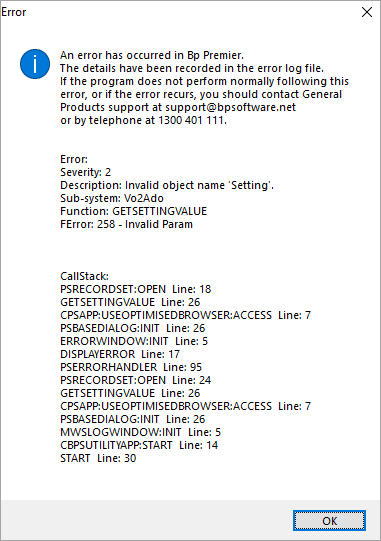
When launching the View ePrescription Log or View MWS Log utilities users will encounter a callstack error.
Workaround: Users can click OK through the error and use the utility as normal. |
Oxford SP1 |
82186 |
|
Patient details |
If the network connection to the server is interrupted while the Patient details screen is open, a callstack error will occur. Workaround: Click OK to continue, then close and re-open the Patient details screen to confirm the network disruption is resolved by confirming any changes have been saved |
Not yet resolved. |
83342 |
|
Follow up assignment of benefit |
When using the Bulk resend from the Follow up assignment of benefits screen the Contact note generated will display the Recorded by user as Practice and not the user who sent the SMS via Bulk resend. |
Oxford SP1 |
83556 |



 AU
AU 